
CRM for Pool Service: Routes, Repairs and Follow-Up
Connect pool visits, access problems, repair estimates and billing. Learn what to test in pool service software before changing systems.
Key points
Pool service software should connect recurring visits with customer communication, repair approvals and billing. A CRM helps preserve the relationship and next action; route and chemistry tools support specialist work. Test them as separate capabilities. The best fit lets the office see why a visit was incomplete, what the customer needs to approve and who is handling the follow-up.
This is a guide to organizing a pool service business, not water-treatment advice. Chemical readings, dosing, equipment safety and professional operating procedures require the right training and technical standards. A customer-management record should not substitute for those controls.
Start with the difference between a visit and a result
A technician arriving at a property does not always mean the planned service was completed. Access may fail, equipment may need review or the customer may request work outside the agreement. If every visit is simply marked “done,” the office loses the information needed to respond.
Choose a small set of meaningful outcomes. A completed visit, an access problem and a repair recommendation should be distinguishable. Each exception needs a next action, not merely a different color on the calendar. Decide who contacts the customer and what information they need to do it.
In your trial, create a fictional recurring customer and record an incomplete visit. Ask another person to find the reason and explain the next step. If they have to call the technician for basic context, the handoff needs improvement.
Keep the property record separate from assumptions
A customer may manage more than one property, and the onsite contact may not be the person who approves repairs. Record those relationships clearly. Confirm the service address, the appropriate contact and the approval route before sending a proposal.
Access notes should be current and appropriately restricted. Record relevant gate or appointment arrangements without copying sensitive details into every message. Give someone responsibility for updating those notes when a customer reports a change. An old access instruction can cause a failed visit even when the route itself is correct.
A practical service record
- Customer and property, identified separately.
- Current service agreement and visit pattern.
- Appropriate onsite and billing contacts.
- Access instructions available to the right team members.
- Visit outcome and any supporting note.
- Repair question or estimate awaiting a decision.
- Owner and date for the next customer update.
Keep specialist readings in the purpose-built record your operation requires. Do not hide a technically important observation in a general sales note where the next technician may never see it.

Evaluate route tools by changing the route
A route screenshot can look organized without handling real disruptions. Test a missed visit, an unavailable technician and a property that must be visited at a different time. Inspect how those changes affect the team view, customer messages and future recurring work.
If route optimization matters to your business, ask the vendor to demonstrate it with realistic constraints. Do not assume that displaying addresses on a map means the software optimizes travel or understands access windows. Write down which decisions remain manual.
A small operation may be comfortable with a simpler schedule. A larger route business may need deeper controls. The decision should follow your actual work, not a promise that adding more features automatically makes the business more efficient. Compare the time and clarity of the trial tasks rather than inventing savings estimates.
Turn repair observations into an owned conversation
A technician may notice something that requires a repair discussion. The office needs enough information to explain the next step without overstating the diagnosis. Record what was observed, what was checked by a qualified person and what still needs assessment.
Use the template only when it matches the process. If a repair estimate is ready, send a clear scope instead of an ambiguous request to “approve the repair.” Identify the property, proposed work, amount and any condition that must be confirmed. Keep approval attached to the correct estimate.
Then test the handoff back to the technician. The field team should be able to distinguish a recommendation from approved work. A customer saying “please call me” must not be interpreted as authorization to proceed.
Keep recurring service and one-time repairs distinct
A repair may belong to the same customer but have a separate scope and invoice. Preserve that distinction. Otherwise the team can accidentally treat an estimate as included maintenance or bill the same item through both workflows.
During the trial, create a recurring service arrangement and a separate repair estimate. Approve the repair, record its completion and inspect the billing handoff. Confirm that the maintenance schedule continues correctly and that the repair does not change unrelated recurring charges.
Also test a declined repair. The customer relationship remains active even if they decide against the proposed work. Record the decision respectfully and keep any necessary professional follow-up under your established procedure. Do not let a lost sales opportunity cancel the ongoing service by accident.

Make customer updates factual and concise
A service update should say what the customer needs to know and what, if anything, they should do. Avoid technical claims that have not been reviewed. Do not promise that an automated summary establishes a pool's safety or condition.
If the visit could not be completed, say what happened in plain words and explain the next step. If the office is reviewing a reschedule, do not send a firm date until it is confirmed. The record should show whether the customer received and responded to that update.
Choose the channels your customers use and your team can monitor. In-app alerts, email and mobile push can keep your own team informed; optional staff SMS can help where configured. No external chat app should be required for the daily workflow simply because one manager prefers it.
Check billing against the actual agreement
A skipped visit does not have one universal billing outcome. It depends on the customer's agreement and the reason for the change. The software should make the facts easy to review so the responsible person can apply the correct terms.
Test an invoice question while a recurring schedule remains active. Someone should be able to pause the relevant reminder, investigate and reply without canceling unrelated service. A payment should be marked confirmed through your supported provider or reconciliation process, not merely because a customer sent a receipt image.
If you keep accounting software, identify which system owns invoice numbers, adjustments and payment reconciliation. An integration needs a clear division of responsibility. Two systems both editing the same financial fact can create confusion even when each one works correctly on its own.
Choose the right starting tools in 360
360's Pool & Spa edition recommends specialist tools such as routes and pool chemistry where they fit. Contacts, conversations, appointments, estimates and invoices remain useful across business types. Industry recommendations are not restrictions: another business can enable a tool through Settings → Features, and changing editions preserves saved work.
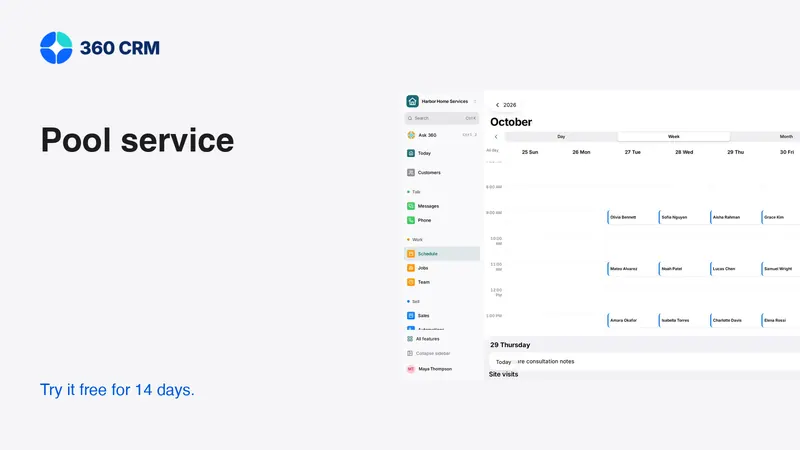
Use the demo to inspect the customer-administration workflow, then separately test the specialist capabilities your team requires. The screenshots here show fictional records and general administration screens; they are not evidence of a completed chemistry or route-validation test.
The business plan is the current published price per business with unlimited users and a 14-day trial. Review pricing and any provider charges before moving live communications. Your first success criterion should be a clear exception handoff, not the largest number of enabled tools.
Frequently asked questions
Is a shared inbox enough for a pool route business?
It can organize customer conversations, but it does not automatically provide route planning or specialist service records. Test those requirements separately and keep the systems your operation needs.
Should repair estimates change the maintenance agreement?
Only through an explicit, agreed change. Keep one-time repair scope and approval distinct so a repair decision does not unintentionally alter recurring visits or charges.
Can software decide chemical treatment from a customer message?
Do not treat a message or general assistant response as qualified treatment guidance. Use trained personnel, verified readings and the technical procedures appropriate to your operation.
Try 360 free for 14 days
Put one workflow from this article into practice. $79/month per business, unlimited users, every tool included.
See how 360 fits your trade
Keep reading
Industries
CRM for Landscapers: Projects and Repeat Visits
Separate landscape installations from recurring maintenance. Organize site notes, weather changes, approvals and billing with this guide.
Industries
Choose a Workspace That Fits Your Business
Your industry is a starting point, not a limit. Learn what changes, what stays and where to turn on another tool.
Industries
Best CRM for Contractors: A Practical Buying Guide
Choose contractor software with a real lead-to-job test. Compare estimates, follow-up, team access and costs before moving your customer records.