
White-Label CRM for Agencies: Setup and Pricing Math
Agency Starter is $97 with 3 clients, +$25 each; Unlimited is $197. See the 7-client break-even and budget for support, setup and usage.
Key points
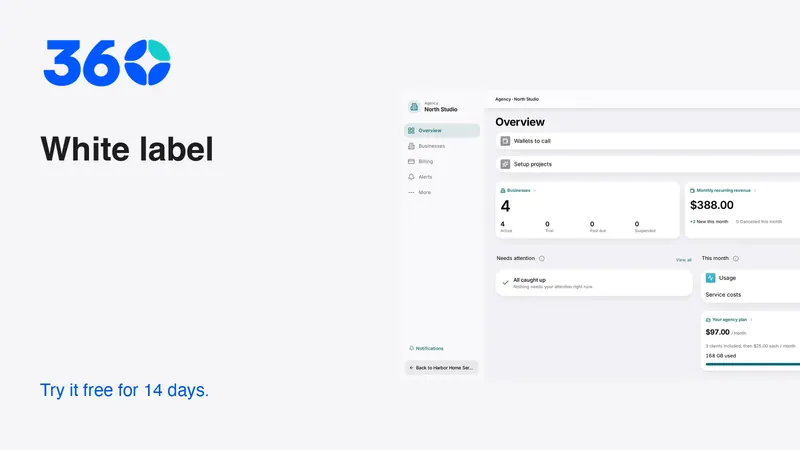
A white-label software service needs a useful customer workflow, a clear support promise and a cost model that includes more than the platform subscription. 360 has two agency plans: Agency Starter at $97 per month with three client businesses included and $25 per month for each extra client, and Agency Unlimited at $197 per month. The two cost the same at seven clients; from eight clients, Unlimited is cheaper. That subscription math does not include usage, support, processing or acquisition costs.
This article is for agency operators planning a branded service. Customer workspaces should speak to the customer business only; agency billing and resale decisions belong in the agency's own administration experience.
Sell a clear working outcome
Choose a problem you can help a client solve consistently. Examples include unanswered inquiries, unclear estimate follow-up or disconnected customer conversations. Describe the outcome in plain words and show the workflow before discussing a large feature catalog.
A useful offer might be “we set up an owned response process for your incoming inquiries and train your team to use it.” That is more concrete than promising a business will grow simply because it has more software. Do not invent revenue results or use another customer's story without permission and evidence.
Keep the product suitable for different businesses. Industry recommendations can make the starting workspace relevant, but they should not trap a client in a fixed package. A cleaning business and a professional office may share core customer tools while needing different specialist features.
Work through the subscription arithmetic
360 offers two agency plans. Agency Starter is $97 per month and includes three client businesses; each additional client adds $25 per month. Agency Unlimited is $197 per month for any number of client businesses. Both start with a 14-day trial that requires a card, and usage such as calls, texts and AI is billed at provider cost plus 15%. Review the agency offer and written terms before purchase, including applicable taxes. A business that buys 360 directly pays the current monthly Business price, with unlimited users and every tool included.
Compare the same client count
With one, two or three clients, Starter costs $97. At four clients it is $122, at five $147 and at six $172. At seven clients Starter reaches $197, exactly the price of Unlimited. At eight clients Starter would be $222, so Unlimited is $25 cheaper, and the gap grows by $25 with every client after that.
The algebra is short: solve $97 + $25 × (clients − 3) = $197. The answer is seven clients, the break-even point. Below seven, Starter costs less; above seven, Unlimited does. These are arithmetic examples from the stated plan prices, not revenue projections or guaranteed savings after other expenses.
How this compares with all-in-one platform
all-in-one platform's official pricing page, checked on October 19, 2026, lists Starter at $97 per month with three sub-accounts, Unlimited at $297 and Agency Pro at $497, which adds SaaS mode. At three clients the entry prices match. For an agency planning to grow past three clients, the unlimited tiers differ by $100 per month. Recheck both pages on the day you decide, because plan details change.

Keep revenue, contribution and profit separate
Suppose, only as an illustration, an agency charges five clients $150 each per month. Subscription revenue is $750. Subtracting the $147 Agency Starter cost for five clients leaves $603 before all other costs. That remainder is not profit.
You still need to account for support time, onboarding, payment processing, usage you absorb, refunds, other software and customer acquisition. If you charge separately for setup or usage, explain that clearly in the client agreement. Do not hide material recurring charges behind an attractive software headline.
Build a simple worksheet with actual assumptions. Label unknown values rather than filling them with optimistic guesses. Review the worksheet after onboarding real clients so pricing reflects the service you actually deliver. A mathematically cheaper platform plan cannot rescue an offer that requires unbudgeted support every week.
Define what your support includes
Clients need to know who helps when a message fails, an employee cannot sign in or a workflow needs adjustment. Decide what your team handles and what requires a provider or specialist. Write the escalation path before selling the service.
- Setup and initial training responsibilities.
- Support channels and staffed hours.
- Who monitors failed messages or disconnected providers.
- How configuration changes are requested and approved.
- What data can be exported if the client leaves.
- Which usage and third-party costs are separate.
Keep the promise realistic. Do not advertise around-the-clock human support unless you have that coverage. A clear response process is more credible than a vague assurance that everything is “fully managed.”
Build one repeatable onboarding path
Start by understanding the client's business type, current channels and immediate problem. Choose the relevant Industry Edition and review its recommendations with the client. Keep core tools available while enabling specialist tools only when they make sense for the work.
Connect one channel and prove that it receives, assigns and replies correctly. Then add the next channel. Import a small representative sample before moving a full contact list. Review duplicates, ownership, custom fields and communication permissions.
Use a fictional customer to complete the main workflow with the client watching. Let their staff perform the steps themselves after basic instruction. The onboarding is not complete when settings are saved; it is complete when the team knows how to handle the next real inquiry and an ordinary failure.

Make the brand consistent without exposing agency operations
A branded client workspace should use the customer's business identity and relevant language. Internal resale economics, platform setup details and agency terminology do not belong in the customer's daily screens or messages.
Preview customer emails, booking pages, estimates and invoices as well as the main app. Check the sender identity, contact details and links. A logo on the login screen does not establish that the whole experience is correctly branded.
Keep agency administration separate. Agency staff may need a cross-client overview, but when they enter a client's business they should see the customer experience and wording. That separation helps support staff notice what the client actually sees instead of relying on privileged setup screens.
Treat usage as an operating responsibility
Calls, texts, email sending, AI and other provider services can create usage charges. Decide how the client sees those charges and what happens if a connection or balance requires attention. Never imply that unlimited client accounts means unlimited external services.
Review the client's expected use before activation. A business making occasional calls has a different pattern from one using a receptionist extensively. Use estimates as estimates, then check actual usage. Avoid quoting a universal per-client usage amount without knowing the channels and volume.
Client-facing explanations should describe the service and price plainly. Internal margins and provider economics belong in agency administration. The client needs to know what they will pay and how to control use, not how your resale model is structured.
Test isolation and access as part of delivery
Each client should have a separate business workspace with the right users and permissions. Verify that a user invited to one business cannot browse another client's records. Use fictional test data to demonstrate the boundary rather than exposing a real client's information.
Review staff access when a person changes roles or leaves. Keep a record of who can configure channels, approve assistant actions and export data. An agency's convenience should not become a reason to give every employee unrestricted access to every client.
For connected assistants, use the supported permission and approval flow. A shared agency account should not be treated as blanket authorization for all customer actions. Name the business and inspect the proposed action before approving it.
Start small and document what works
Pilot the service with a narrow, agreed workflow. Record the configuration, training steps, common failures and support effort. Use that evidence to improve onboarding before adding more clients or promising more automation.
Explore the 360 agency offering, business pricing and Industry Editions. Keep a written offer alongside the software configuration so the client knows what is included. Before purchase, compare the quoted plan with the written agreement and ask for clarification if any price or included service differs.
A durable agency service makes the client's working day simpler. The software supports that service, but your setup quality, honest expectations and dependable follow-through determine whether the client understands its value.
Frequently asked questions
When is Agency Unlimited cheaper than Agency Starter?
From eight clients. Starter is $97 with three clients included plus $25 for each extra client, so it reaches $197 at seven clients, the same as Unlimited. Usage and other operating costs are separate, so calculate the full service cost too.
Is revenue minus the platform fee profit?
No. Support, setup, processing, usage, acquisition and other expenses still need to be included. Treat the remainder as an intermediate calculation, not a promise of earnings.
Should every client see every available tool?
No. Start with relevant recommendations and a clear daily workflow. Other tools remain available through Settings → Features, so a focused starting point does not restrict future needs.
Try 360 free for 14 days
Put one workflow from this article into practice. $79/month per business, unlimited users, every tool included.
See how 360 fits your trade
Keep reading
Agencies
Alternatives to All-in-One Business Software | 360
Compare all-in-one platform alternatives fairly using official plan sources, workflow tests and migration costs. Find a fit for your business or agency.
Industries
Choose a Workspace That Fits Your Business
Your industry is a starting point, not a limit. Learn what changes, what stays and where to turn on another tool.