
Get Paid Faster: Deposits, Payment Links and Reminders
Make payment terms clear, collect agreed deposits and send useful reminders. A practical guide to cards, Pix and keeping records reconciled.
Key points
Getting paid faster starts before the invoice. Make the scope and payment terms clear, collect an agreed deposit through the right process, send a recognizable payment link and reconcile the result. Reminders help only when the invoice is accurate and the customer has a clear way to raise a question. Pause routine collection messages while an error or dispute is being resolved.
This guide covers practical administration, not universal legal, tax or financial terms. Use agreements and payment methods appropriate to your business and location. No reminder schedule or software feature guarantees when a customer will pay.
Remove uncertainty before requesting money
A customer should understand what the invoice covers and why the amount is due. Confirm the accepted scope, any approved changes, the billing contact and the payment timing. If those facts are unclear, a payment link can simply deliver the confusion more quickly.
Use the same customer and project references across the estimate and invoice. Check the service address separately from the billing address. A business customer may need an internal reference or a specific recipient before its payment process can begin; ask early rather than discovering the requirement after the due date.
If the customer questions an item, give one person responsibility for the answer. Do not let the office send reminders while another teammate is still promising a correction. The communication and financial record need to tell the same story.
Agree on the deposit and explain what it does
A deposit should have a clear purpose and be part of the agreed terms. Explain when it is due, how it relates to the balance and what happens next. Do not choose a deposit percentage from a generic software template without reviewing whether it fits your business and applicable rules.
A simple arithmetic example
For a fictional project priced at $2,000, an agreed $400 deposit leaves a $1,600 balance before any separately approved adjustment. Those numbers are an illustration, not a recommended deposit rule. Show the currency and the relationship between the deposit and total so the customer does not mistake the deposit request for an additional charge.
If scheduling depends on a confirmed deposit, say so before acceptance. If the date still needs confirmation after payment, explain that too. Clear sequencing is more useful than a vague “pay now to secure your spot” message that the schedule cannot support.

Send an invoice people can recognize
Use a clear description, the correct recipient and the expected business identity. The customer should be able to connect the invoice to the work they approved. Avoid unexplained abbreviations or a generic subject line that looks unrelated to the project.
Only mention a recorded deposit if it has actually been reconciled. Preview the invoice and link before sending. Check that the customer sees the correct amount, currency, due date and contact route. Never assume a copied link belongs to the current invoice.
Offer supported payment methods without making promises
Cards, bank-based methods and Pix can make payment convenient when they are supported by the connected provider and appropriate to the customer's location. Confirm availability in the actual account. A logo on a marketing page does not prove that every currency, region or transaction type is enabled for your business.
Stripe's automatic collection documentation explains its supported invoice collection workflow. Configure collection deliberately and confirm customer authorization; do not treat a stored payment method as permission for any future charge.
For Brazil, the Banco Central tariff FAQ explains that business Pix can involve fees. Do not promise that Pix is universally free. Check your provider's pricing, confirmation process and supported refunds before adding it to a customer message.
Distinguish sent, pending and paid
An invoice can be sent without being viewed. A payment can be initiated without being confirmed. A customer can send a receipt image while the payment still needs reconciliation. Keep these states distinct in the record.
Use the payment provider's confirmed result or your documented manual reconciliation process before marking an invoice paid. If a notification is delayed, investigate the provider record rather than charging the customer again or asking them to repeat the payment immediately.
Test a partial payment and a payment that arrives after a reminder is scheduled. The remaining balance should be clear, and future reminders should use the current state. A reminder for the original total after a partial payment can make an otherwise useful system feel unreliable.
Write reminders that help resolve the next step
A reminder should identify the invoice, state the current issue and offer a clear action. Keep the tone respectful and avoid implying wrongdoing. Sometimes the customer is waiting for a correction, an internal approval or a missing document.
Adapt the wording and timing to your agreement. Do not add late fees or threats through an automated template unless the responsible person has reviewed the applicable terms and requirements. The software should implement an approved process, not invent a collection policy.
Pause automation when a person needs to intervene
Create clear stop conditions for paid invoices, active disputes, corrected documents and requests that need review. A paused reminder is not a lost invoice; it is a sign that the next action belongs to a person.
Assign an owner and a date for resolving the issue. If the invoice was incorrect, correct it through the supported process and explain the change. If payment was received elsewhere, reconcile it before restarting any message. Keep the history understandable so another teammate can see why reminders stopped.
Test the failure path as part of setup. Disconnect a test provider or use a safe rejected-payment scenario supported by the provider's test mode. Confirm that the team sees a useful error and knows where to retry. Never test by creating an unintended real charge.
Keep the books and the customer record aligned
Decide which system owns invoices, payment adjustments and accounting entries. If you connect accounting software, verify the supported direction of sync and what happens after an error. Do not assume both systems can edit the same fact safely without a clear rule.
Reconcile fees, partial payments, refunds and deposits through the process your bookkeeper uses. A dashboard showing a paid invoice does not automatically establish that every accounting entry is correct. Review a representative sample with the person responsible for the books before expanding automation.
Keep an exception list: invoices without a billing contact, payments awaiting reconciliation, corrections awaiting approval and completed work not yet invoiced. Those items give the team something useful to act on. A total overdue figure alone does not explain how to resolve the underlying work.
Test the payment journey from the customer's side
Open the invoice on a phone using fictional data and the provider's test environment where available. Check readability, the amount, currency, supported methods and the path for asking a question. Confirm the success message corresponds to the actual payment state.
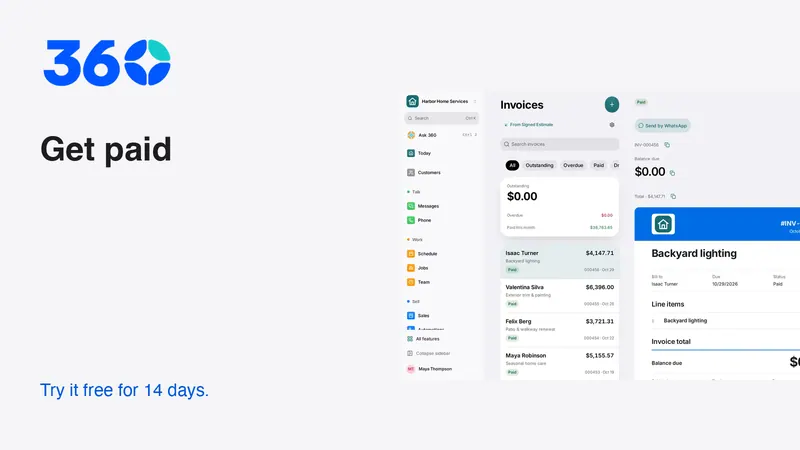
360's everyday business tools connect estimates and invoices with the customer record. The screenshots here show demo data, including an example Brazilian payment page; they are not live payment requests. Review pricing, provider availability and usage before connecting a real account.
Start with one clearly understood workflow. Accurate terms, recognizable invoices and a reliable reconciliation routine are a stronger foundation than a large collection sequence nobody monitors.
Frequently asked questions
Should every business collect a deposit?
Not necessarily. Use payment terms appropriate to the service, agreement and applicable requirements. Explain any deposit clearly and show how it affects the remaining balance.
Is Pix always free for a business?
No. Fees depend on the account and service arrangement. Check your bank or provider and the Banco Central guidance before describing Pix costs to customers.
What should stop an invoice reminder?
Confirmed payment, an active correction or dispute, and other approved review conditions should stop or pause the relevant sequence. Assign someone to resolve the issue and keep the customer informed.
Try 360 free for 14 days
Put one workflow from this article into practice. $79/month per business, unlimited users, every tool included.
See how 360 fits your trade
Keep reading
Sales & estimates
How to Send Estimates Customers Can Say Yes To
Write clear scopes, useful options and respectful follow-ups. Use example messages and a review checklist to send estimates with confidence.
Sales & estimates
A Follow-Up Routine You Can Keep
Give every inquiry an owner, a next action and a date. A small routine that is easier to maintain as your business grows.